Home / Security and control
Your crew works inside your rules. Your data stays yours.
Workers can do real work because they are kept inside clear limits: what they may do, what they may see, and what they can never touch. This page shows how, without the jargon.
On every action a worker can take.
For every decision that needs a person.
Each company's data kept separate.
The AI never holds your keys.
You decide what a worker may do. Try it.
Rules apply to every action: per app, per action, per worker. Reading can run freely while sending, creating or deleting asks first. Flip the switches and see what your crew would do.
- Start from a careful preset: reads run freely, anything that sends, creates or deletes asks first.
- One worker can be tighter or looser than the company. Only the differences are stored.
- For email, rules you lock at company level come first, and the strictest rule wins.
One inbox for every decision. One record of every action.
When a rule says Ask, the worker stops and sends you a card showing exactly what it wants to do. You approve it, change it, or say not now. Whatever you decide is written down.
- The same inbox for emails, phone calls, connected systems, PCs and your own APIs.
- Approve from your desk or from your phone. Approvers can be named people, a role or managers, with a back-up if nobody answers.
- A card nobody answers expires, and the action does not run. Unanswered always means no.
- Edit before you send: the worker sends exactly what you approved, not what it first drafted.
- Every action is recorded with the worker, the time and the rule that applied. Open any run to see each step.
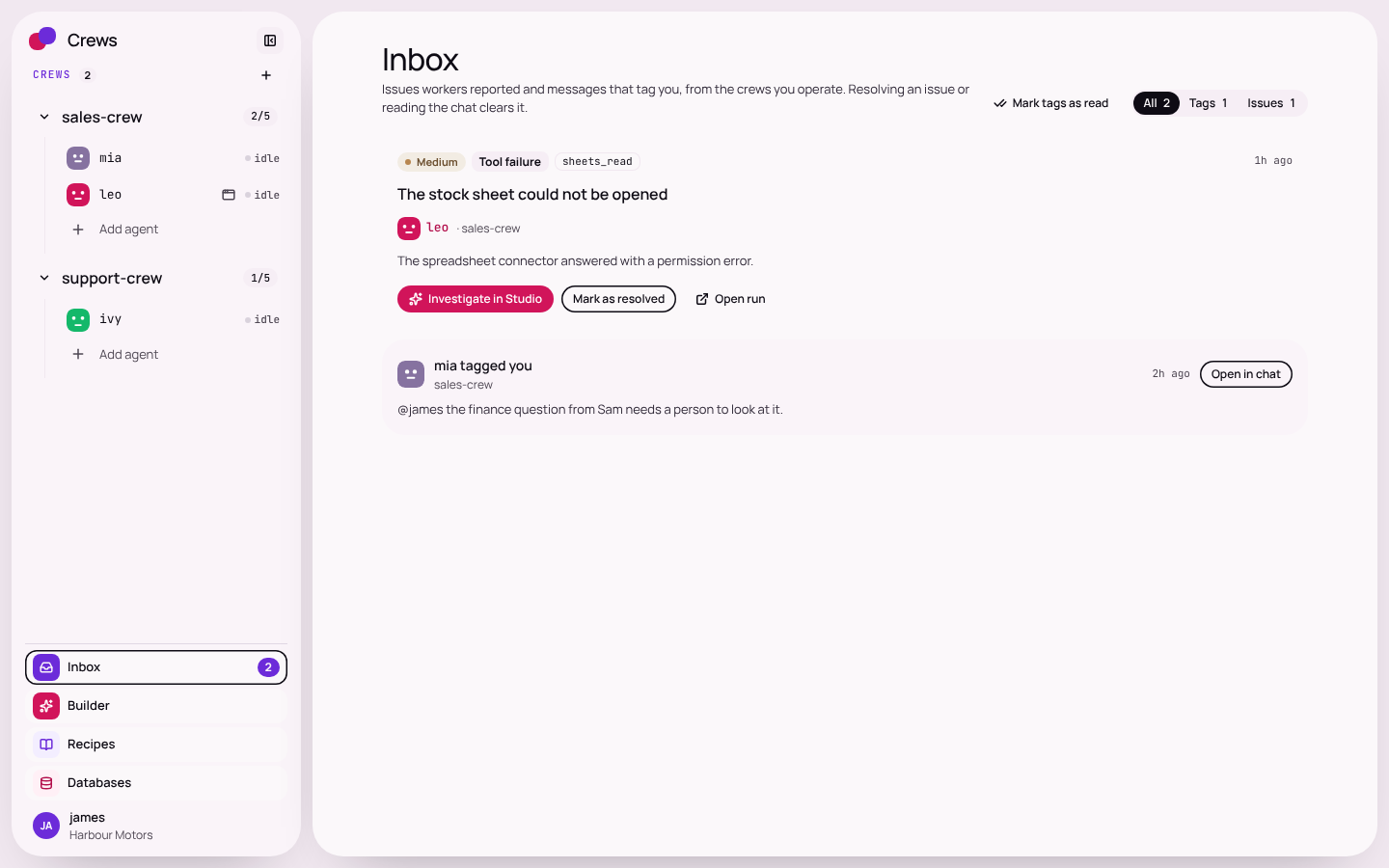
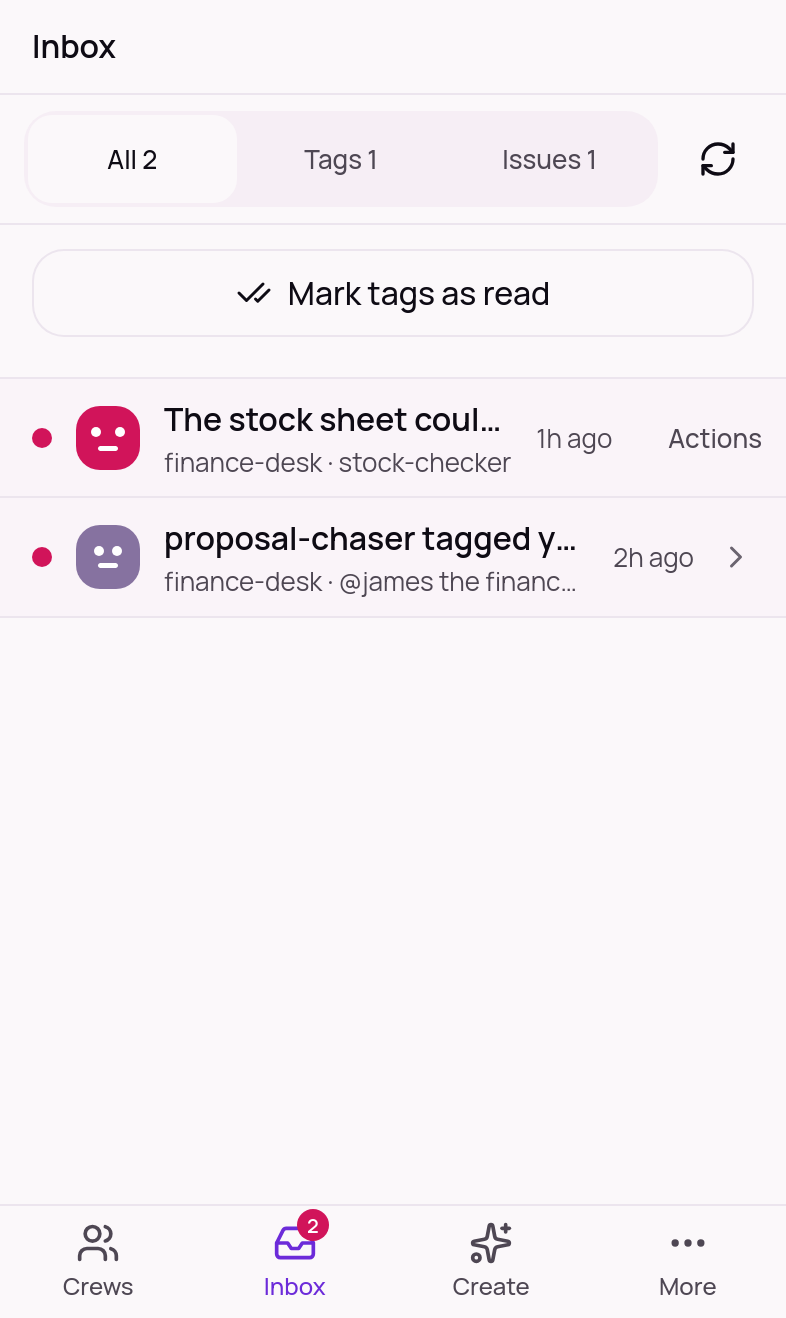
Example from Crews for Motor Trade. Real product screens: the inbox on desktop and on the phone.
A way to stop it. A ceiling on how much.
Control is not only about permission. It is about being able to pause everything in seconds, and knowing the work cannot run away from you.
- Stop all: one button halts every worker's actions across your company.
- A stop control on each worker, and one switch to pause every routine in a crew.
- Set what a worker may do and when: the hours it works, who approves, which accounts and lists it must not touch.
- Monthly caps with a warning as you approach the limit and a pause when you reach it, in plain units of minutes, pictures and clips.
- Limits on the number of workers and runs, and on the time, size and calls in a single job.
- Repeated identical failures stop. They do not loop.
- Rules you set by talking to a worker are saved as numbered versions, so a change can be undone. Every change made in chat is repeated back with an Undo, and recorded.
- Words from outside never give orders. An email, a call or a web page cannot change your settings or lift a limit, and a worker started by outside words is never given the tools to change them.
- Letting a worker act on its own is always your choice, always has daily limits, and Stop all still works.
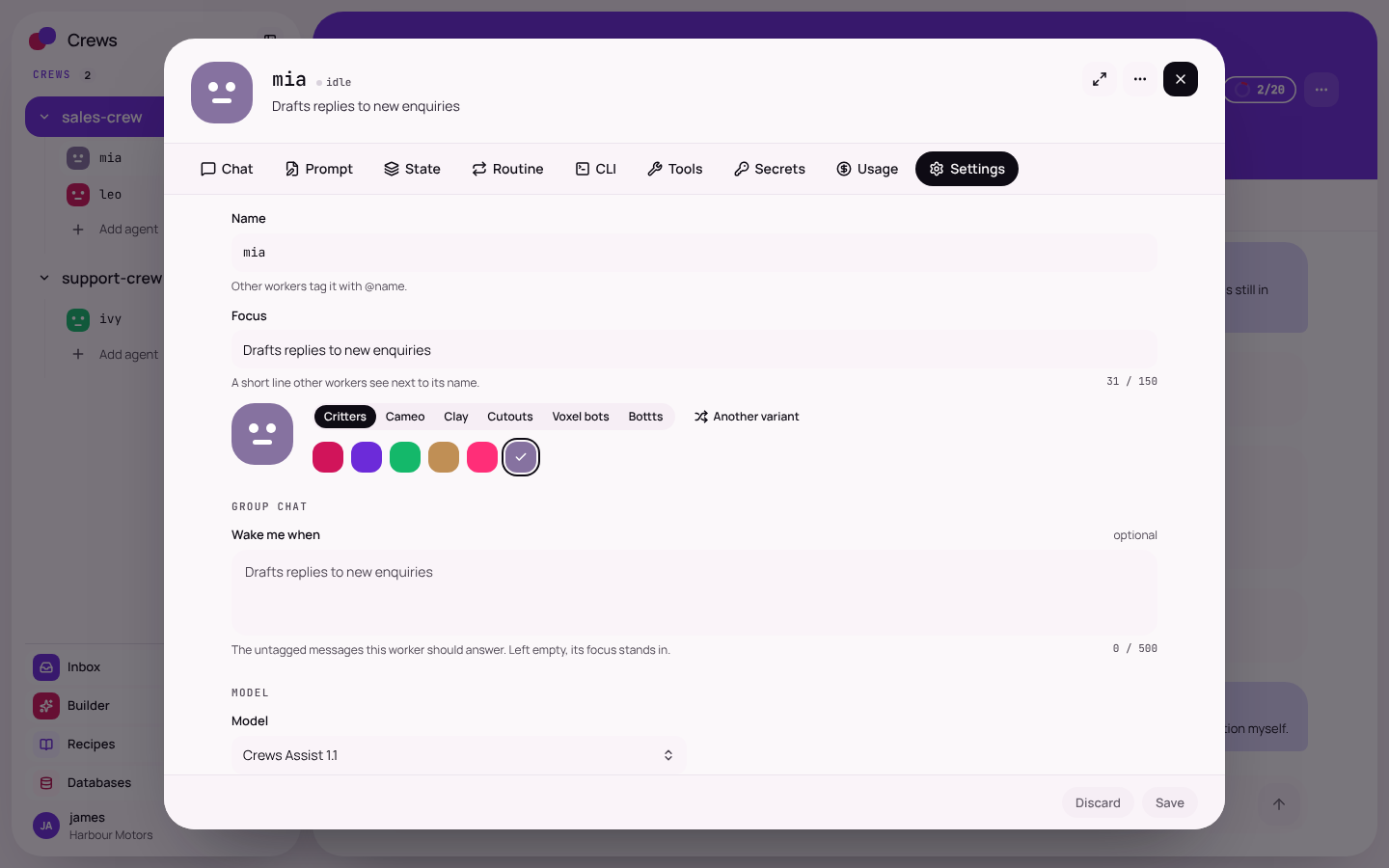
Example from Crews for Motor Trade. Real product screen: one worker's settings.
Each company's data stays in its own walls.
Crews serves many companies on one platform, and none of them can see another's workers, chats, notes, files or logins. Two separate checks protect that, so one slip cannot expose anything.
The app checks every request
Every request is tied to a company before anything is returned. A request for another company's record is refused.
The database checks every row
Row-level rules on the company tables mean the database itself refuses another company's records, even if an app check were ever missed.
Every worker works in a sealed room.
When a worker runs code, opens a browser or handles files, it does that in its own private workspace, not on a shared machine. Each company's workers are kept on their own network, apart from everyone else's.
- A private workspace per worker, with its own browser.
- A separate network for each company, with limited reach to the wider internet.
- Only the internet addresses a worker is allowed to use can be reached. Private and internal addresses are refused.
- A company's workers can reach only that company's own PCs.
- Text in an email, web page or system reply is treated as untrusted and cannot give a worker orders.
Illustration. Not a product screenshot.
The AI never sees your keys.
A worker often needs a key to use a system. Crews lets it use the system without ever holding the key, so a tricked or mistaken worker has nothing to leak.
- You paste a key once, into a secure card that shows the exact website it will be sent to. It is never typed into a chat.
- Keys are stored encrypted for your company only, and tied to their own website.
- Our server adds the key at the moment of use, and scrubs it from every reply, log and workspace.
- A key is never sent on if a request is redirected to another site.
- Keys can be changed at any time, and a usage page shows calls by service.
This key will only be sent to
Illustration of the key card. Not a product screenshot.
The right people see the right things.
Your own team is separated too. Owners manage owners, admins manage members, keys and tools, and members work in the crews they run.
- Approvers can be named people, a role or managers.
- Owners and admins can always answer an approval.
- The same roles and approvals apply on your phone.
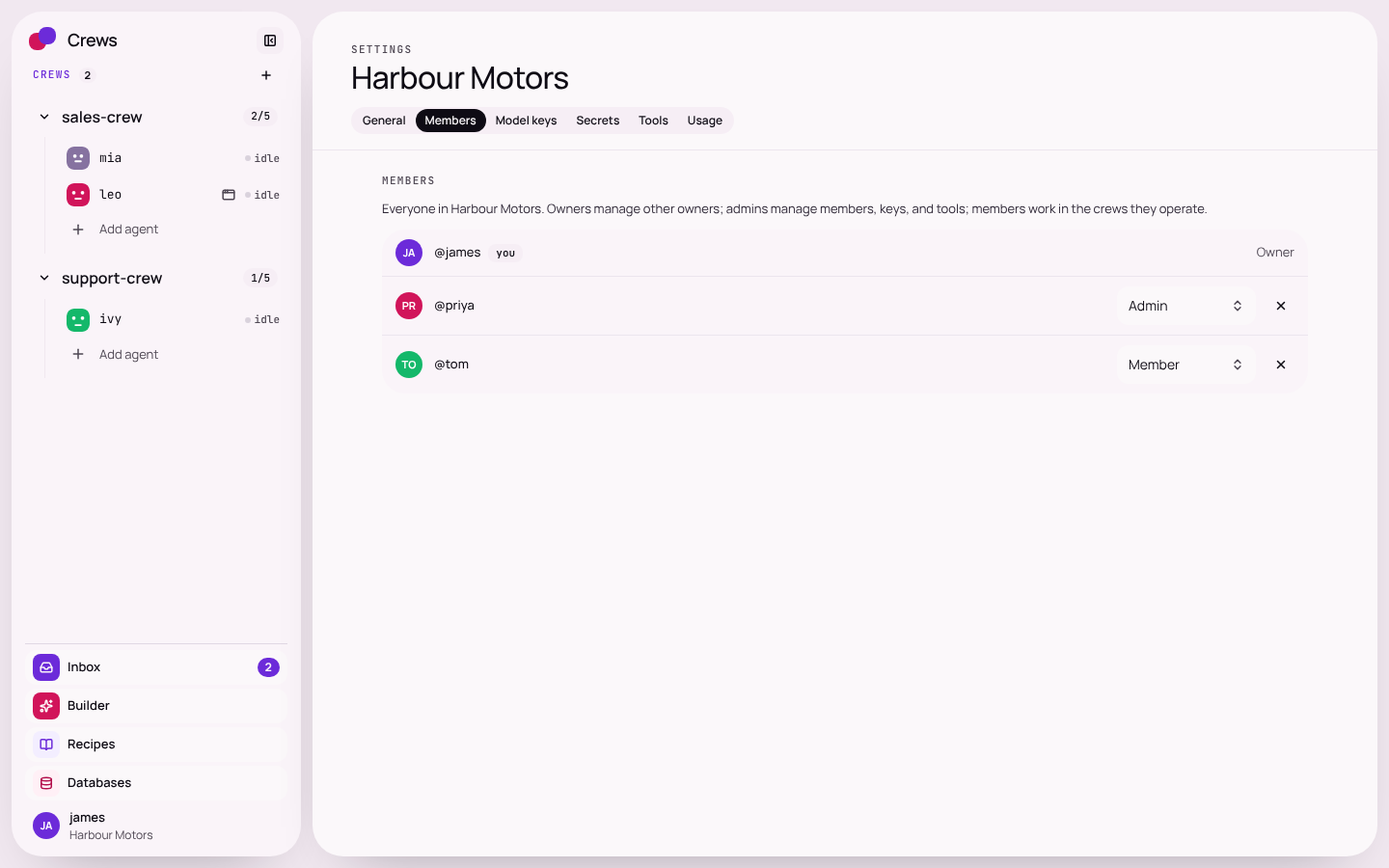
Example from Crews for Motor Trade. Real product screen: team roles.
Hosted in the EU. Handled in plain sight.
Crews runs on servers in the European Union, behind a protective network layer, with a backup every night. Here is how your data is treated, in plain English.
Kept by company
Every company's data is separate: workers, chats, notes, files, logins and settings.
Keys stay out of the AI's sight
Stored encrypted per company, added by our server, and scrubbed from replies, logs and workspaces.
Everything is on the record
Each action is logged with the worker, the time and the rule that applied, and you can open any run step by step.
You choose who sees what
Roles for owners, admins and members, and approvals by person, role or manager.
Backed up every night
Nightly backups, with the restore process rehearsed so that every company comes back whole.
Questions about your needs?
Tell us what matters to your business and we will walk you through exactly how it works. Talk to us
Tested by attacking every route as a rival company, and reviewed by independent AI security reviewers.
To be plain about it: the reviewers were independent AI security reviewers. It was not an audit by an outside firm, and it is not a certificate.
A shared test builds two full companies, each with users, crews, workers, runs, secrets, notes and files. Then test writers act as the second company and try every route the app answers, using the first company's identifiers. We ran it before and after we added the database walls, and an independent AI security reviewer read all the separation code.
- Attacked as a rival company, route by route.
- Checked again at the database, not just in the app.
- Read by independent AI security reviewers, not only marked by ourselves.
- Re-run whenever the product changes.
A short list, kept firmly.
- Show the AI your keys.
- Mix one company's data with another's.
- Let a worker act outside the rules you set.
- Run an action that was waiting for approval when nobody answered.
- Hide what a worker did.
- Let text on a web page or in an email give a worker orders.
Ask us anything. We will show you.
Bring your toughest questions about data, control and hosting to a 30-minute demo, or tell us what matters most and we will answer it in writing.