Home / How it works
Three steps. No technical knowledge.
Connect your systems, set your rules, launch your crew. You stay in charge at each step, and our team can do the setting up for you.
Connect
Plug in the apps and systems you already use. Keys stay out of the AI's sight.
Set your rules
Choose what each worker may do, who approves, and how much it can use.
Launch your crew
Describe the crew in plain words, review the draft and press Deploy.
Plug into the systems you already use.
Pick your apps from the catalogue and sign in once. If a system is not in the catalogue, it can still be connected with its address and a key, and for software with no connector, a worker can use your PCs.
- A catalogue of business apps, with every action available.
- Test each connection before a worker uses it.
- Paste a key once, into a secure card. The AI never holds it.
- A switch for every tool, and one to turn a whole system off.
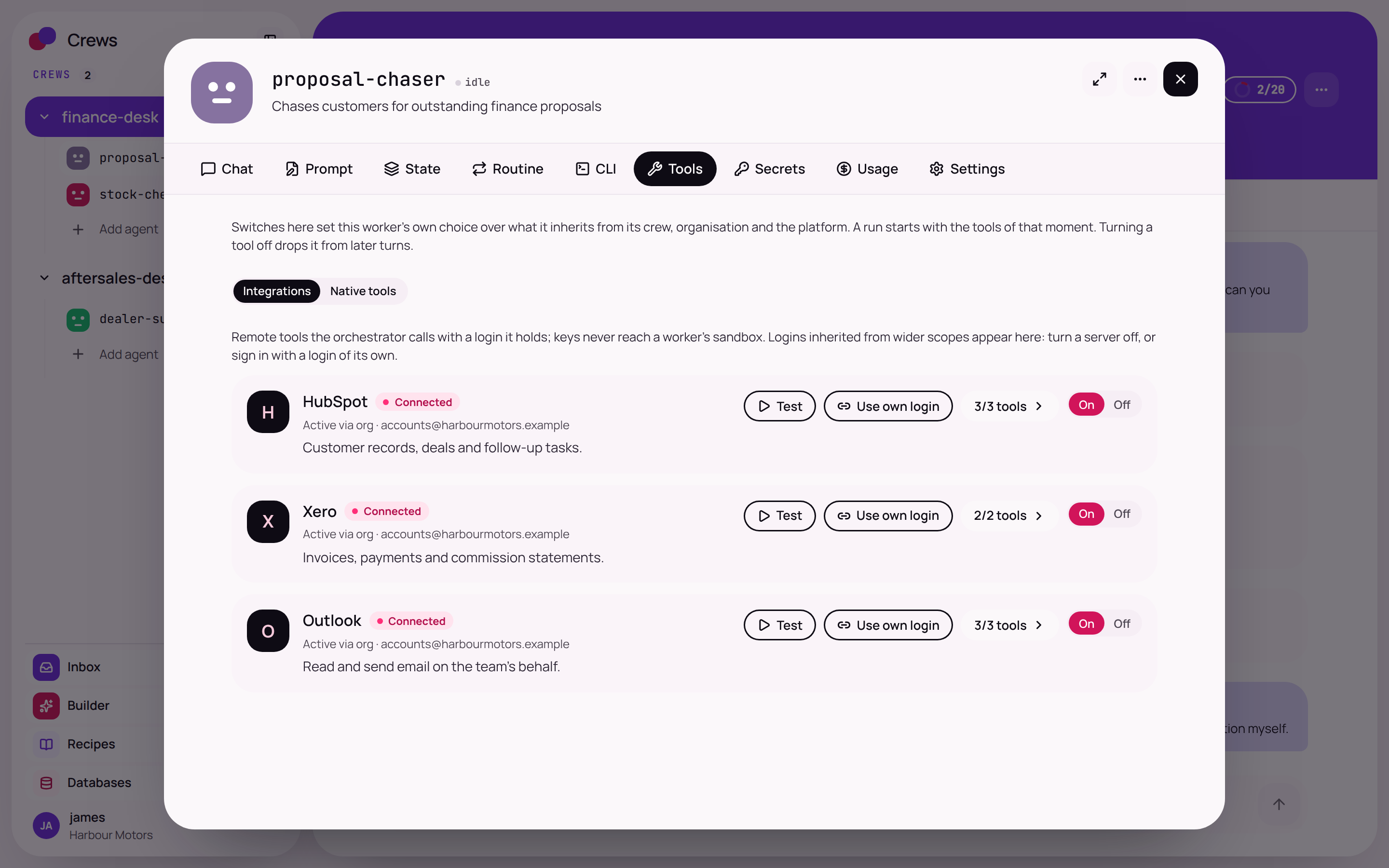
Example from Crews for Motor Trade. Real product screen: connected systems, each with its own switch.
What you do
- Tell us which systems you use.
- Sign in once as Crews.
What we do
- Check each connection with you.
- Connect systems with their own address and key.
- Keep every key out of the AI's sight.
Decide what a worker may do, and what needs you.
Every action gets a rule: Allow, Ask or Block. Start from a careful preset, then loosen it as you gain confidence. You also set who approves, the hours it may work and a monthly limit.
- Allow, Ask or Block per app, per action and per worker.
- Reading runs freely. Sending, creating and deleting ask first.
- Approvals by named person, role or manager, with a back-up.
- Monthly limits with a warning before the wall.
Illustration of the rules a worker starts with. Not a product screenshot. Try the switches on the Security page.
What you do
- Choose how much freedom each worker gets.
- Name who approves, and the back-up.
What we do
- Suggest a careful starting set of rules.
- Write the house rules with you: tone, who handles what.
- Test the rules on sample jobs before anything real.
Describe it in words. Deploy it when you are happy.
Tell the Builder what you want in plain English. It drafts the crew: the workers, their instructions and the connections they need. You review it, change anything, then deploy.
- Review the whole draft before anything starts.
- Workers share a chat, notes and a routine, like a team.
- Set a routine so work happens overnight and a summary waits for you in the morning.
- Save a crew you like as a recipe, and use it again in a couple of clicks.

Example from Crews for Motor Trade. Real product screen: a drafted crew, ready to review and deploy.
What you do
- Describe the crew you want.
- Review the draft and press Deploy.
What we do
- Draft the crew, or build it for you.
- Hand it over with the rules you chose.
- Stay on hand while the crew settles in.
Start small. See it work. Then grow.
A typical plan, shown as a guide. Every business is different, and we set the pace with you.
- Day 1
Pick one job
A short call to choose one job that is repeated, clear and worth handing over, such as answering new enquiries or chasing overdue quotes.
You bring: a job and someone who knows how it is done today. - Days 2 to 3
Connect
Connect the systems that job touches. Each connection gets a test, so you know it works before a worker uses it.
You do: sign in once as Crews. We do: the rest. - Week 1
Draft the crew and set the rules
Describe the crew in plain words and review the draft. Set rules cautiously: anything that sends, creates or changes asks first. Try it on sample jobs.
You do: read the draft and set your limits. - Week 2
Launch with Ask switched on
The crew starts on real work, and every important action waits for your OK. Check the inbox each day and open the record to see each step.
You do: approve, edit or say not now. - Weeks 3 and 4
Tune and add a routine
Correct the instructions where needed. Where you have approved drafts without changes, loosen the rule. Add a routine so work is waiting for you each morning.
You do: decide how much freedom each worker gets. - Day 30
Review and choose the next job
Look at what the crew did and where your time went. Keep what works and pick a second job.
You do: decide where to go next.
One job done well beats ten half-started.
You do not have to hand over your whole business. Choose one repeated job, watch the crew do it with every important action waiting for your OK, and widen the crew when you are ready.
- Pick a job that repeats and has a clear finish.
- Keep Ask switched on until you trust it.
- Add workers and routines one at a time.
The things people ask before they start.
Do I need to be technical?
No. You describe the job in plain words and the Builder drafts the crew for you to read and approve. If you would rather not set anything up, we will build it for you.
What if a worker gets something wrong?
Workers ask before anything important: sending, creating, changing or deleting. You see exactly what they plan to do, and you can edit it or say not now. Every step is on the record, so you can see what happened and correct the instructions.
If nobody answers an approval, the action does not run.
Can I stop it?
Yes, at any level. There is a stop control on each worker, one switch to pause every routine in a crew, and a Stop all button that halts every worker's actions across your company.
Which systems can a crew connect to?
The catalogue covers hundreds of business apps. Any other system with an address and a key can be connected too. For software with no connector, a worker can use your PCs, or its own browser for websites.
If a system you rely on is not on our list, tell us. We will look into it with you.
Do I have to replace the systems I already use?
No. Crews works alongside what you have. Workers use your existing systems through the connections you set up.
Where is my data, and who can see it?
Crews is hosted in the EU. Each company's data is kept separate from every other company's, and inside your company you choose who sees what with roles and approvals. Read more on Security and control.
Does it work on my phone?
Yes. The phone app has the whole of Crews: chat with workers, answer approvals, check routines and watch a job run. It uses the same sign-in, roles and approvals as the desktop.
Will it replace my team?
No. It takes on repeat work such as follow-ups, checking and first replies, and hands decisions to your people with the whole story attached.
How much does it cost?
It depends on how many workers you want and how much work they do. Book a demo and we will go through it with you, with no obligation.
Can you build the crew for us?
Yes. Tell us the job and our team designs the crew, connects your systems, sets the rules and hands it over. See Build with us.
Put a crew to work. Keep the final say.
Pick one job. We will show you how a crew would do it, on a call of about 30 minutes.